
It's easy to export your WinEUR chart of accounts to import it into a third-party tool such as Sway Finance. For example, you can automate the coding of accounting lines using our AI algorithms and then import them into WinEUR, saving you valuable time.
To export the WinEUR chart of accounts in XML format:
1. In the main menu of the selected company, open the "Import/Export" submenu and select "Import/Export XML".
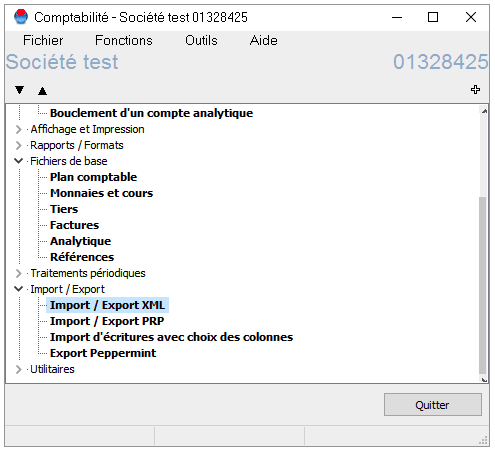
2. Select the default format and click "Change" (A) or create a new format (B):

3. In the "Export" submenu:
i. Select items to be exported > "Without entries".
ii. Deactivate all options except "Export general ledger accounts" and "Export tax codes".

4. Close this window and then click on the ‘Export’ button. The export window will open.
5. Enter the name and/or location of your file (you can restore it later if you use GIT Cloud).
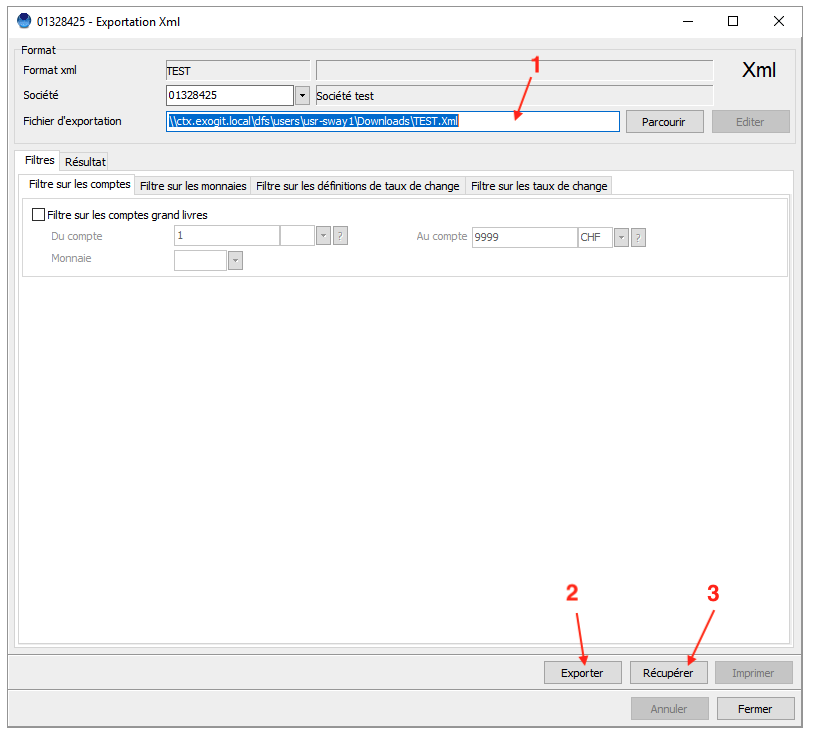
6. Click on "Export" and then on "Retrieve (GIT Cloud)" to retrieve your chart of accounts exported in XML format.


