
Winbiz is a well established accounting software in Switzerland. You can easily optimise your pre-accounting workflows by using Sway Finance:
Here's how to proceed:
1. Open the chart of accounts (from the Accounting tab).
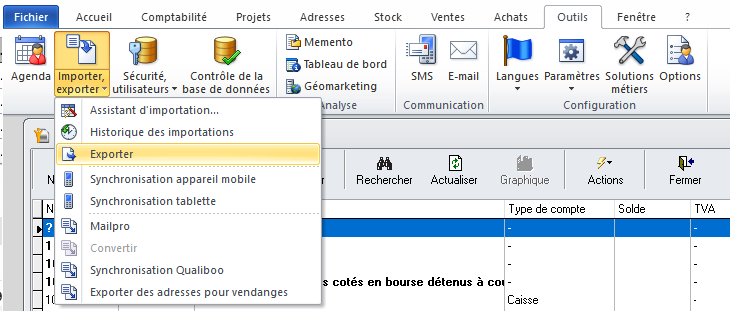
2. Go to the "Tools" tab, then "Import, Export" > "Export".
3. Check the tabs:
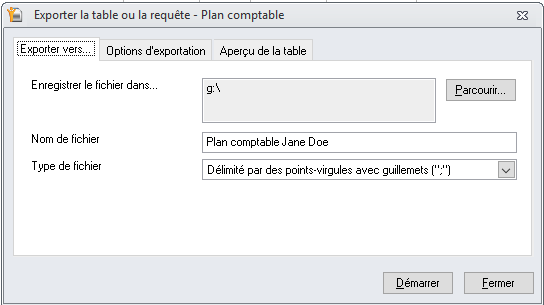
a. Export to...
i. Select the correct destination folder (to find the chart of accounts once exported)
ii. File type: “Semicolon-delimited with quotation marks”
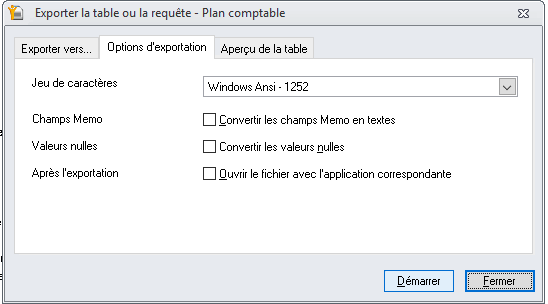
b. Export options:
i. Choose Windows ANSI - 1252 format
ii. Keep all boxes unchecked (Memo Fields, Null Values, After Export).
4. Click on Start.
✅ A CSV file is generated. You can import it directly into Sway Finance in the workspace settings and the "Chart of accounts" submenu.


