

Your Sway account signs you in to the web app and to every workspace you belong to. Signing up gives you the whole platform for one month.
Before you start
- An email address that you can read now: Sway sends a confirmation link to it.
- A mobile phone, for the second factor that the web app asks for right after the confirmation.
Create the account
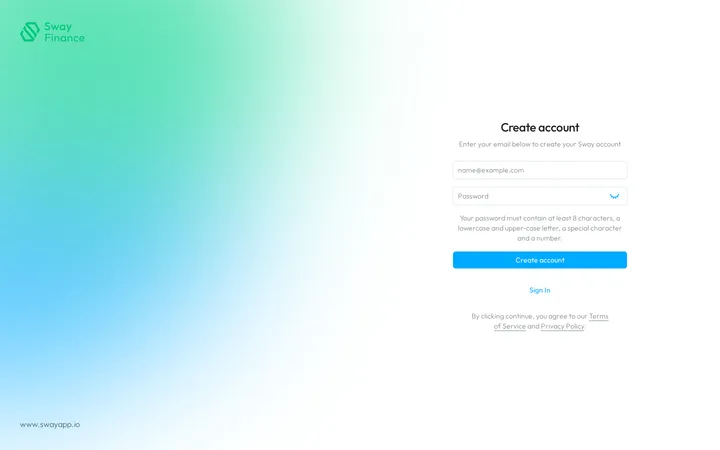
- Open the sign-up page. On the Sign in page of the web app, choose Sign up. The Create account page opens.
- Enter your email address. Type it in the first field.
- Choose a password. Type it in the second field; the eye icon at its end shows what you type. The hint under the field sums up the rules, which the table below lists.
- Create the account. Choose Create account. You accept the Terms of Service and the Privacy Policy linked under the button.
Sway sends you a confirmation email and opens Confirm your e-mail address. If the address already has an account, the web app says so: sign in instead.
The link of an invitation to a workspace opens the same page, with your email address filled in.
Confirm your email address

- Find the email. The page shows the address that Sway wrote to. Look in your spam folder too.
- Open the link. The link in the email confirms the address.
- Go on. For five minutes, the page checks every few seconds and opens Second factor setup as soon as the address is confirmed. After that, reload the page to go on.
If no email arrives, Resend sends it again. Sign out at the top right stops here: until the address is confirmed, each sign-in brings you back to this page.
Fields
| Field | What it takes | Required |
|---|---|---|
| Your email address, in a valid format. It becomes the address you sign in with. | Yes | |
| Password | At least 8 characters, with an upper-case letter, a lower-case letter, a digit and a special character such as ! ? # or @. No spaces. | Yes |
Next step
Set up your second factor in Secure your sign-in.
Related answers
Written from the Create account screen of web app 1.58.0, with the labels of its EN, FR and DE catalogues.