

The export turns the coding of a bank account into a file of entries for your accounting tool. To export the transactions themselves, as a statement or a CAMT.053 file, see Export bank transactions; Xero receives them through its integration.
Before you start
- The Owner, Admin, Member or Support role in the workspace.
- A bank account linked to an account of your chart of accounts: the dialog offers no other.
- The transactions of the period coded. Uncoded entries still export, but may need a review before the import.
- For Winbiz, the VAT scheme of the workspace in Accounting information, and a suspense account in your chart of accounts, which takes the other side of an uncoded transaction.
Export the entries
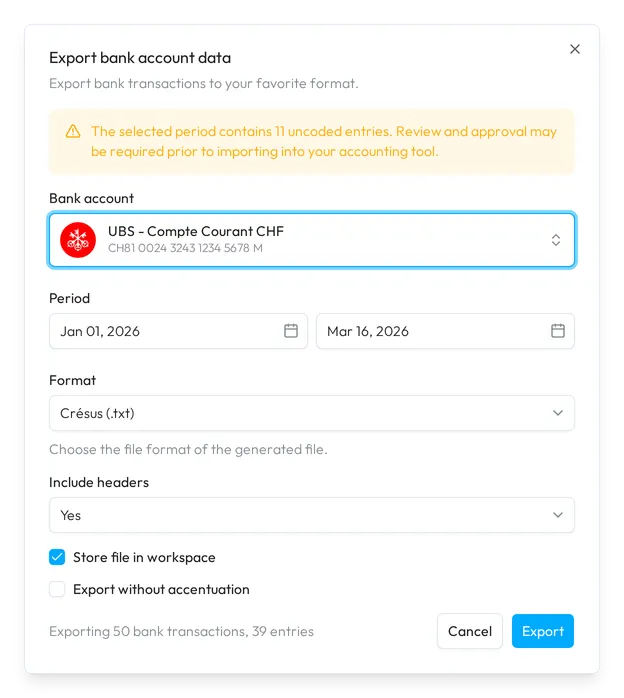
- Open the export. On the Accounting page, choose Export at the top right. The Export bank account data dialog starts on the bank account of the page, and on its period when you set one.
- Check the account. In Bank account, pick the account to export, one per export.
- Set the period. In Period, pick the start date and the end date. The end date cannot be before the start date.
- Pick the format. In Format, choose the file of your accounting tool. Crésus (.txt) and Winbiz (.csv) add Include headers, which starts the file with a line of column names; Abacus (.xlsx) adds Mandant number.
- Set the options. Tick Store file in workspace to keep a copy with the bank account, and Export without accentuation to replace accented letters, for a tool that does not read them.
- Export. Check the count at the bottom, such as Exporting 50 bank transactions, 39 entries, then choose Export. Your browser downloads the file once Sway has generated it; Cancel stops the wait.
To export some transactions only, tick their rows on the Accounting page and choose Export in the selection menu. The dialog then shows Selection instead of Period, with the number of selected transactions, and keeps their bank account.
The dialog remembers the format and its settings from your last export in this browser.
Formats
| Format | What you get |
|---|---|
| Crésus (.txt) | A text file of entries for Crésus. A split transaction becomes a multiple entry; each of its lines needs an account. |
| Winbiz (.csv) | A CSV file of entries for Winbiz, with the VAT method of your VAT scheme. |
| WinEUR (.txt) | A text file of entries for WinEUR. |
| Abacus (.xlsx) | An XLSX file of entries for Abacus, with the mandant number on each line. |
The name of the file holds the bank, the last four characters of the account number, the currency and the period.
Checks before the export
Once the account and the period are set, Sway checks their entries:
- A yellow notice counts the uncoded entries of the period. The export still runs.
- A red notice says that some transaction amounts do not match the sum of their entries. Export stays greyed out until you correct them on the Accounting page.
- For Winbiz (.csv), a red notice asks for a VAT scheme, with a link to the accounting settings. Export stays greyed out until the workspace has one.
Where the file goes
Your browser downloads the file. With Store file in workspace ticked, Sway also keeps it in the files of the bank account, under the scope Export: see Bank account files.
Import the file
The FAQ shows each import step by step:
- Import transactions into Crésus.
- Import transactions into Winbiz.
- Set up document numbering in WinEUR, then import transactions into WinEUR.
- The export from Sway in pictures: How to export accounting entries from Sway?
Fields
| Field | What it takes | Required |
|---|---|---|
| Bank account | One bank account linked to your chart of accounts. | Yes |
| Period | A start date and an end date, the end not before the start. A selection of transactions replaces it. | Yes |
| Format | Crésus (.txt), Winbiz (.csv), WinEUR (.txt) or Abacus (.xlsx). It starts on Crésus (.txt). | Yes |
| Mandant number | The mandant number of the company in Abacus, a whole number. Abacus only. | No |
| Include headers | Yes or No. Crésus and Winbiz only. | No |
| Store file in workspace | Ticked or not. | No |
| Export without accentuation | Ticked or not. | No |
Next step
Import the file into your accounting tool with the FAQ above, or go back to cash coding for the next period.
Related answers
Written from the Export bank account data screen of web app 1.58.0, with the labels of its EN, FR and DE catalogues.