

Your profile belongs to you, not to a workspace: your name and picture show in every workspace that you belong to, whatever your role in it.
Before you start
- For a new picture, an image file on your computer.
Update your profile
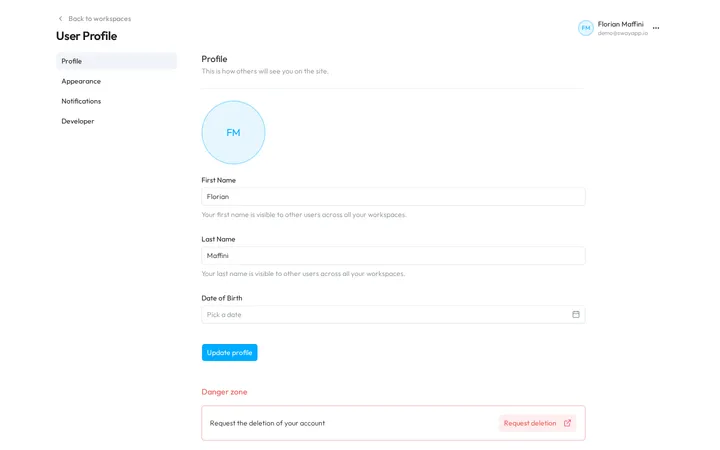
- Open your profile. At the bottom of the sidebar, choose your name, then Profile. The User Profile page opens on Profile.
- Change your picture. Point at the round picture, click the upload arrow that appears, and choose an image. Sway saves it at once and shows it a few moments later.
- Correct your name. Edit First Name and Last Name. Other users see them in all your workspaces.
- Add your date of birth. Date of Birth is optional.
- Save. Choose Update profile. Sway confirms with Change successful.
The menu on the left leads to the other personal pages: Appearance, Notifications and Developer. Back to workspaces, above the title, takes you back to your workspaces.
Choose the theme
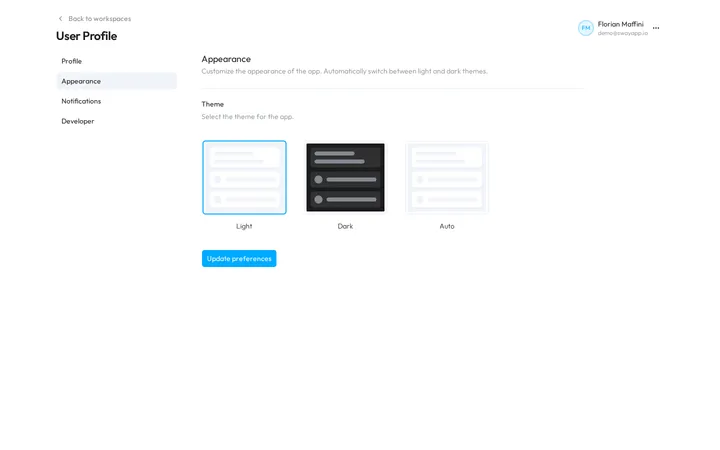
- Open the appearance. In the menu of the profile, choose Appearance.
- Pick a theme. Under Theme, choose Light, Dark or Auto, which follows the light or dark setting of your device.
- Apply it. Choose Update preferences.
The web app keeps the theme in this browser: on another browser or computer, choose it again.
Your sign-in
The web app has no page to change how you sign in:
- You chose your second factor when you created your account: see Secure your sign-in.
- To change your password, choose Forgot password? on the sign-in page: see Sign in.
Delete your account
Under Danger zone, Request deletion opens the account deletion request form of swayapp.io in a new tab. Sway does not delete the account on the spot: its team contacts you to validate the request first.
Fields
The Profile form:
| Field | What it takes | Required |
|---|---|---|
| First Name | Your first name, up to 30 characters. Other users see it in all your workspaces. | Yes |
| Last Name | Your last name, up to 30 characters. Other users see it in all your workspaces. | Yes |
| Date of Birth | A date from 1 January 1900 to today, picked in the calendar of Pick a date, with a menu for the month and the year. | No |
The Appearance form:
| Field | What it takes | Required |
|---|---|---|
| Theme | Light, Dark or Auto. | No |
Next step
Choose which events reach you in Notifications.
Written from the Profile screen of web app 1.58.0, with the labels of its EN, FR and DE catalogues.