

Before you start
- The Owner, Admin or Support role in the workspace. With the Member role, the page opens, but Sway refuses to save the changes.
- The VAT number of the company and the VAT scheme under which it declares VAT.
Set the VAT and the currency
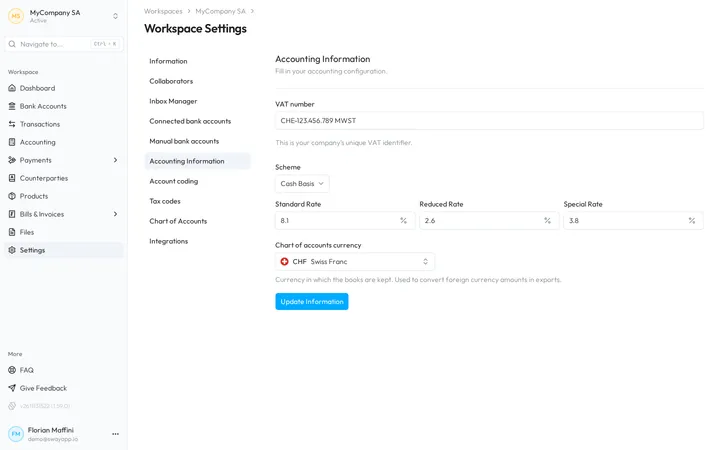
- Open the page. In the sidebar, choose Settings, then the Accounting Information tab.
- Enter the VAT number. VAT number takes the unique VAT identifier of the company, such as CHE-123.456.789 MWST.
- Choose the scheme. Scheme offers Cash Basis, Accrual Basis, Net Tax Rate and Flat Tax Rate. The rate fields under it follow the scheme.
- Check the rates. For Cash Basis or Accrual Basis, Sway fills in 8.1, 2.6 and 3.8 %: correct them if your rates differ. For the two other schemes, type your rate.
- Pick the currency of the books. Under Chart of accounts currency, choose the currency in which you keep the books.
- Save. Choose Update Information. Sway confirms with Change successful.
The schemes
- Cash Basis declares VAT on the payments received, Accrual Basis on the invoices issued. Both settle VAT at the statutory rates, as the effective method does: the page asks for Standard Rate, Reduced Rate and Special Rate.
- Net Tax Rate follows the net tax rate method. With it, as with Flat Tax Rate, the page asks for a single Fixed Rate.
- With no scheme, the page shows no rate.
Where Sway uses it
- The Winbiz export needs a scheme. Without one, the export dialog points to this page and keeps Export greyed out: see Export to your accounting tool.
- Chart of accounts currency converts the amounts in a foreign currency in the exports. The import of a chart of accounts fills it in when it is empty, and asks you when the file uses another currency: see Chart of accounts.
Fields
| Field | What it takes | Required |
|---|---|---|
| VAT number | The unique VAT identifier of the company, up to 50 characters. | No |
| Scheme | Cash Basis, Accrual Basis, Net Tax Rate or Flat Tax Rate. | No |
| Standard Rate | For Cash Basis or Accrual Basis, the standard rate in percent, from 0 to 100. It starts at 8.1. | No |
| Reduced Rate | For Cash Basis or Accrual Basis, the reduced rate, from 0 to 100. It starts at 2.6. | No |
| Special Rate | For Cash Basis or Accrual Basis, the special rate, from 0 to 100. It starts at 3.8. | No |
| Fixed Rate | For Net Tax Rate or Flat Tax Rate, the single rate in percent, from 0 to 100. | No |
| Chart of accounts currency | The currency in which the books are kept, such as CHF. Sway uses it to convert the amounts in a foreign currency in the exports. | No |
Next step
Set up the chart of accounts that Sway codes the transactions to.
Related answers
FAQHow to configure the accounting settings?GlossaryVAT SchemesGlossaryNet Tax Rate MethodGlossaryEffective Method (VAT)
Written from the Accounting Information screen of web app 1.58.0, with the labels of its EN, FR and DE catalogues.