

A tax code holds a VAT rate and the details that your accounting tool expects with it. When you code a transaction to an account that carries a tax code, Sway applies its rate and computes the VAT amount of the entry.
Before you start
- The Owner, Admin, Member or Support role in the workspace.
- A chart of accounts, to pick the account that the VAT posts to. Its import, or the Swiss SME template, also brings tax codes.
Add a tax code
- Open the tax codes. In the sidebar, choose Settings, then the Tax codes tab.
- Open the form. Choose Add at the top right. A workspace without tax codes shows No tax codes yet and Add a tax code instead. The Add Tax Code dialog opens.
- Name it. Type the Tax Code Name. Sway fills in External Tax Code ID from the name until you type an ID of your own.
- Give the rate. Type the Tax Rate (%), such as 8.1, then the optional fields of the table below.
- Add it. Choose Add.
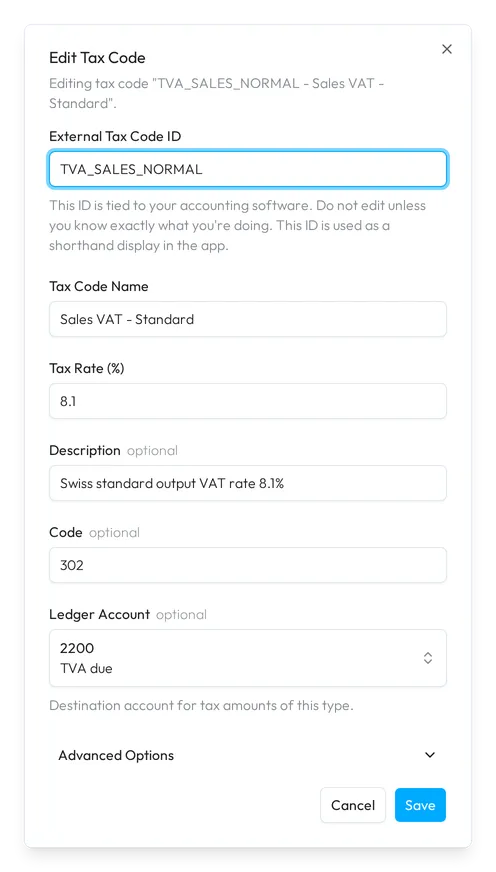
To change a tax code, choose Edit in its menu: Edit Tax Code holds the same fields, and Save keeps them.
The list
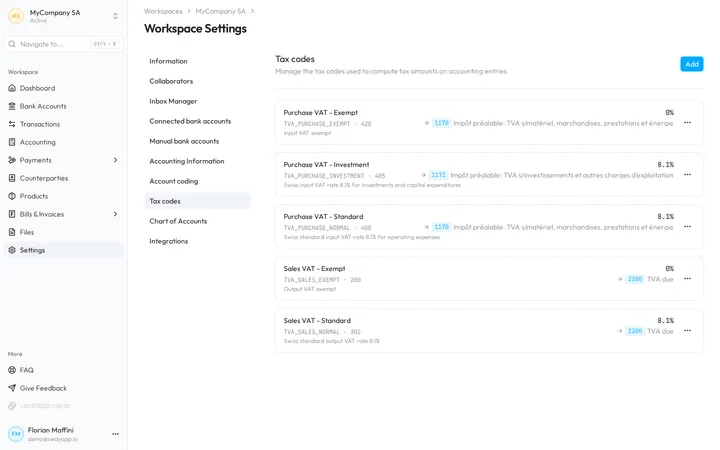
Each tax code shows its name and its rate, its external ID and its code, its description, and, after an arrow, the ledger account that its VAT posts to. Elsewhere in the web app, such as on an account of the chart, the badge of a tax code opens it on this page.
Delete a tax code
- Open the deletion. Choose Delete in the menu of the tax code.
- Confirm it. Are you sure you want to delete this tax code? names it. Choose Delete.
- Free it if it is in use. When accounts or account coding rules use the tax code, Sway keeps it: The tax code is in use and cannot be deleted lists them, with a link to each, disabled rules included. Change them, then choose Retry Delete.
Fields
| Field | What it takes | Required |
|---|---|---|
| External Tax Code ID | The ID that ties the tax code to your accounting software, such as 311. The web app shows it as a shorthand. Change it only if you know exactly what you are doing. Sway warns when another tax code uses the same ID, but allows it. | Yes |
| Tax Code Name | The name of the tax code, such as Sales Normal. | Yes |
| Tax Rate (%) | The rate in percent, such as 8.1. It starts at 0. | Yes |
| Description | A description of your own. | No |
| Code | The code of the tax for reporting, from the tax authority or your accounting tool, such as 302. | No |
| Ledger Account | The account of the chart that the VAT amounts of this tax code post to. Winbiz needs one to import accrual basis accounting back. | No |
| Rounding Factor | Under Advanced Options, the rounding of the VAT amounts: No rounding, Cents, 2-cent rounding or 5-cent rounding. | No |
Next step
Code the transactions in Cash coding.
Related answers
Written from the Tax codes screen of web app 1.58.0, with the labels of its EN, FR and DE catalogues.