

Before you start
- The Owner, Admin or Support role in the workspace. With another role, the page shows No access.
- At least one live bank account. See Connect a bank account.
Open the bank connections
In the sidebar, choose Settings, then the Connected bank accounts tab. The Bank Connections page lists one block per consent, that is per bank that you connected, in the order of the bank names.
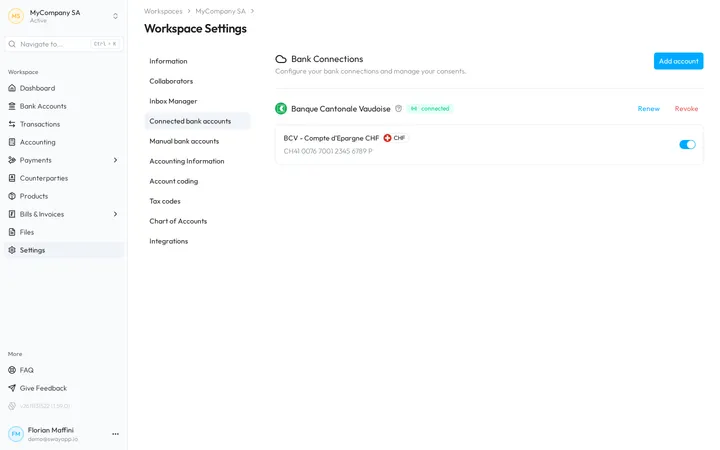
Each block shows:
- The bank, with the shield that tells whether Sway has verified its connection.
- connected or disconnected. Hover over the mark to read the state of the consent. An orange disconnected mark waits for you to act on it; a grey one is solved.
- Expires on and the end date of the consent, when the bank sets one.
- The actions that the state of the consent allows: Renew and Revoke while it is connected, Solve or Archive once it is not.
- The accounts that the consent covers, each with its name, its currency, its IBAN and a switch.
Add account at the top right connects one more bank, as Connect a bank account explains.
Renew a consent
- Find the connection. On Bank Connections, find the bank whose consent you want to extend.
- Start the renewal. Choose Renew. The dialog You are about to renew your bank consent prepares a secure link to your bank.
- Authorise the access again. Choose Authenticate…, sign in at your bank, and approve the access as it asks.
- Check the new end date. Back in Sway, the block shows the new Expires on date.
Renew appears only while the consent is connected. Once a consent has expired or was revoked, connect the bank again from Add account: see What is a revoked consent?
Revoke a consent
- Find the connection. On Bank Connections, find the bank whose access you want to end.
- Revoke it. Choose Revoke, read the dialog Are you sure you want to revoke this consent?, and confirm with Revoke.
Sway stops updating the accounts of that consent, and switches them off, so they no longer show in the rest of the web app. Their history stays in Sway: switch an account back on to show it again.
A revocation cannot be undone. To read the accounts again, connect the bank again and give a new consent at your bank.
Solve or archive a disconnected consent
A consent also ends when your bank revokes or rejects it, or when it runs out. Its block then shows disconnected, and the accounts of the consent show the same mark on the bank account pages.
- Solve appears when the consent was revoked or rejected. Mark as solved removes the warnings about this consent from the web app, and the mark turns grey.
- Archive appears on a disconnected consent once it is solved or has expired. Do you want to archive this connection? warns that the connection leaves this page; Sway keeps or deletes its data as its privacy policy sets out.
Show or hide an account
The switch beside each account decides whether the account appears in the rest of the web app, in the lists of accounts, the balances and the exports. Switch it off to hide an account that you do not use; switch it back on to show it again.
A disconnected account that you switch on shows its history up to the disconnection, with the disconnected mark: see Balance and History showing disconnected account(s), what does that mean?
Rename an account
Hover over the name of an account and choose the pencil. In the dialog Edit Bank account name, enter a name from 2 to 100 characters and choose Save. The new name shows everywhere in the workspace.
Next step
Open an account to read its balances and history.
Related answers
Written from the Bank Connections screen of web app 1.57.1, with the labels of its EN, FR and DE catalogues.